


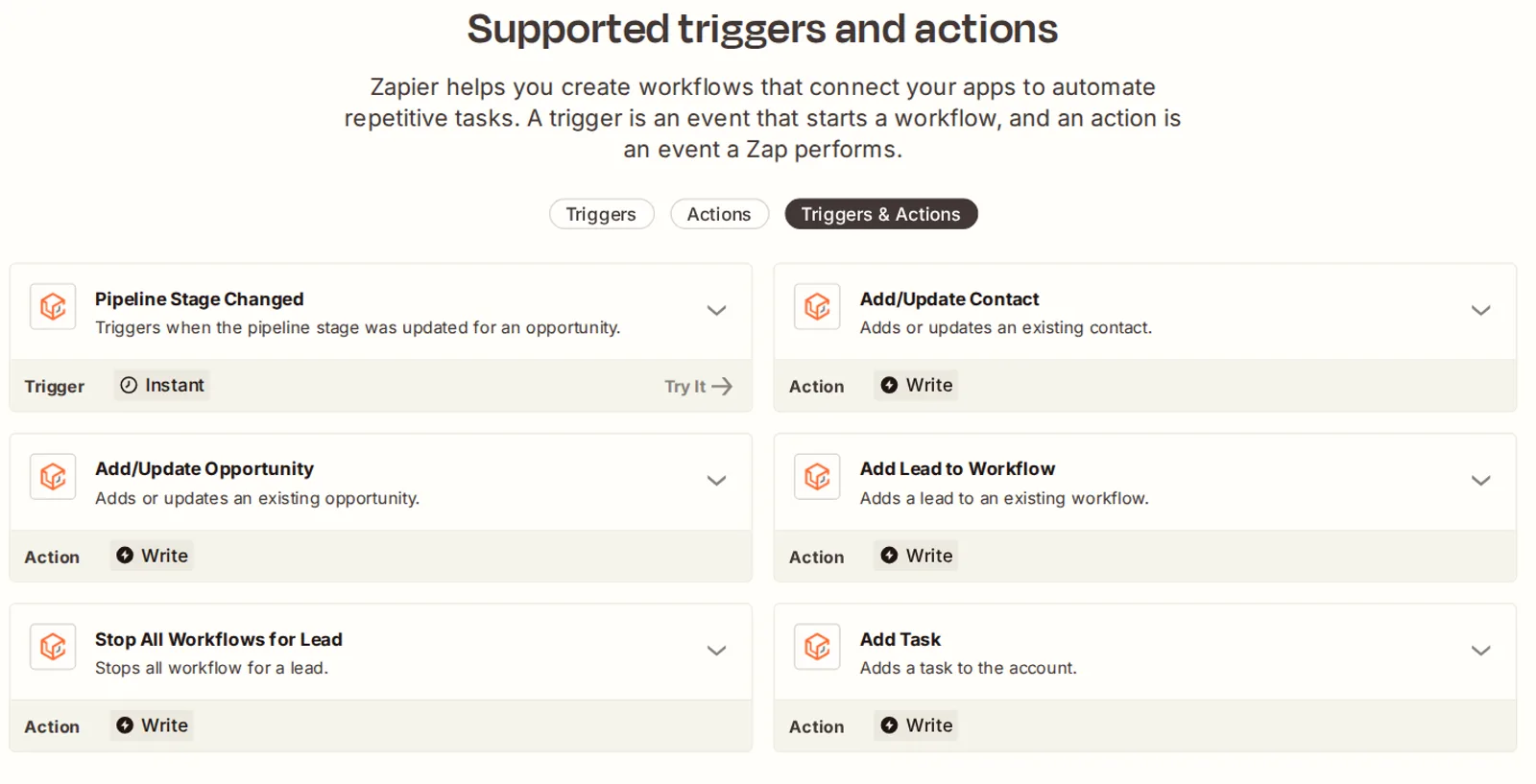
- The LeadConnector app on Zapier lists one trigger and five actions. GoHighLevel's own workflow builder lists more than a dozen native triggers, from Facebook lead forms to Shopify orders.
- Premium actions (Inbound Webhook, Google Sheets, Slack, Custom Webhook) cost $0.01 per execution with 100 free per sub-account. A thousand billed runs is $10; Zapier Professional is $19.99 to $29.99 a month for 750 tasks.
- Stripe, PayPal, Google and Outlook calendars, Google Business Profile, QuickBooks, Shopify, Zoom and WhatsApp connect natively. None of them needs a Zap.
- Keep Zapier for apps with no native connection and no API you can hit with a custom webhook, or when the logic spans several third-party tools.
- API access: Private Integration tokens replace v1 keys, and unused keys are deleted after 90 days. The limit is 100 requests per 10 seconds and 200,000 a day per app per sub-account.
Do you need Zapier with GoHighLevel?
Usually not for the Zaps you're paying for today. Every one of the five we see most has a native trigger or action in GoHighLevel's workflow builder now. A Facebook lead into the CRM, a new row in Google Sheets, a Slack alert, a tag on a Stripe payment, a follow-up on a Shopify order. You need Zapier for the app GoHighLevel doesn't connect to and can't reach by webhook.
That's a different answer from two years ago, when HighLevel's own Facebook troubleshooting guide still pointed people at Zapier or Pabbly for lead forms. Since then the native side has grown; the Zapier app hasn't.

What does the GoHighLevel Zapier integration actually give you?
One app, called LeadConnector, which HighLevel's Zapier setup guide describes as "the official, whitelabeled HighLevel connection." You sign in with your CRM login and pick the sub-account. Zapier can then create or update contacts and opportunities, add a lead to a workflow, stop workflows for a lead, or add a task.
| On the Zapier app page | What it does |
|---|---|
| Trigger: Pipeline Stage Changed | Fires when an opportunity moves stage |
| Action: Add/Update Contact | Creates or updates a contact |
| Action: Add/Update Opportunity | Creates or updates a pipeline opportunity |
| Action: Add Lead to Workflow | Drops a contact into an existing workflow |
| Action: Stop All Workflows for Lead | Halts every workflow for that contact |
| Action: Add Task | Creates a task in the account |
Zapier, LeadConnector integrations page, as rendered on 17 September 2026: one trigger and five actions listed.
- 01In Zapier, click Create, then Zaps, and pick LeadConnector as the trigger app.
- 02Choose the trigger event, for example Pipeline Stage Changed.
- 03Under Account, click Sign In, and log in with your GoHighLevel email and password on the LeadConnector screen.
- 04Pick the sub-account to connect. LeadConnector then shows under Accounts in the Zap setup.
Those steps are HighLevel's own, from the Zapier connection guide updated 18 September 2025. Read that list the other way round. Almost everything Zapier can do on a GoHighLevel account is push data in. Its one trigger is a pipeline stage change. If you want a Zap to fire on a form, an appointment or a payment, the practical route is a GoHighLevel workflow sending an outbound webhook to Zapier. That's exactly what HighLevel's webhook guide suggests. At that point the workflow is already doing the work.
Which Zaps does GoHighLevel replace natively?
The complete trigger list, updated 19 June 2026, is where to check before you build anything in Zapier. These are the native equivalents of the Zaps we remove most often.
| The Zap you're paying for | The native equivalent | Cost |
|---|---|---|
| Facebook or Instagram lead ad to CRM | Facebook Lead Form Submitted trigger, with field mapping, per the lead ads setup guide (14 Aug 2026) | Free |
| TikTok or LinkedIn lead form to CRM | TikTok Form Submitted and LinkedIn Lead Form Submitted triggers | Free |
| New contact to a Google Sheet | Google Sheets premium action: create, look up, update or delete rows, single or in bulk | $0.01 per execution |
| Slack alert on a new lead | Slack premium action: message a user, a private or a public channel | $0.01 per execution |
| Tag a contact after a Stripe payment | Payment Received trigger, filtered by product, source or status; works across Stripe, PayPal and any connected gateway | Free |
| Follow up on a Shopify order or abandoned cart | Shopify Order Placed and Abandoned Checkout triggers, after the OAuth Shopify connection (15 Sep 2026) | Free |
| Anything that can post JSON to a URL | Inbound Webhook trigger | $0.01 per execution |
| Anything with an API | Custom Webhook action: GET, POST, PUT or DELETE with bearer, API key, basic or OAuth2 auth | $0.01 per execution |
HighLevel help center pages linked in each row; premium pricing from the HighLevel pricing guide, updated 22 August 2026.

Two of those deserve a caveat. A Stripe One Time Charge action exists. As we read the documentation, it's written for agencies charging their sub-account admins, not for a business charging its own customers. And there's no Stripe-specific trigger; Payment Received is gateway-agnostic, which is better, but it means your filter does the work.
How do GoHighLevel webhooks work: inbound, outbound and custom?
Three tools, and the names get mixed up. The outbound Webhook action is free and sends a standard contact payload to a URL, with custom key-value pairs added. Inbound Webhook (a trigger) and Custom Webhook (an action) are premium, at a cent each.
| Tool | Direction | What the docs say | Price |
|---|---|---|---|
| Webhook action | Out of GoHighLevel | Sends a standard set of contact fields to your URL; POST by default; add your own keys and values | Free |
| Inbound Webhook trigger | Into GoHighLevel | Accepts POST, GET or PUT; JSON only; an email or phone is mandatory in the payload; re-select the mapping reference when the data shape changes | $0.01 per execution |
| Custom Webhook action | Out, to any API | GET, POST, PUT or DELETE; bearer token, API key, basic auth, OAuth2 or custom headers; JSON or form body | $0.01 per execution |
HighLevel help center: outbound webhook (16 Mar 2026), inbound webhook (16 Sep 2026), custom webhook (11 Dec 2025).
What do premium actions cost compared with Zapier tasks?
A cent a run, with the first 100 runs free on every sub-account. HighLevel's premium features guide says each execution is debited from the agency wallet, and agencies can rebill at cost or with a markup. Zapier prices by task, and its help center counts a task as any successful action that runs; triggers, filters and errors don't count.

Put the same workload through each.
A small business that runs 750 automation steps a month pays $19.99 on Zapier Professional billed annually, or $29.99 monthly, for 750 tasks. Run those 750 steps as GoHighLevel premium actions and they cost $6.50 after the free hundred. On Make, the Core plan is $9 a month billed annually for 10,000 credits, where each module action counts as one credit. Cent-per-run pricing only loses at very high volume, and by then you're on Zapier Team at $69 a month billed annually.
Two prices to watch. Zapier's Free plan gives 100 tasks a month on two-step Zaps, enough for one low-volume connection. But the pricing page lists Webhooks by Zapier and premium apps as paid-plan features. The outbound-webhook route in the section above needs Professional or higher. And the GoHighLevel add-on menu already carries the bigger line items, so a premium action bill is rarely what tips the monthly total.
Paying for Zaps your CRM can already run?
We audit the Zap list, rebuild what GoHighLevel does natively, keep the connectors that earn their fee, and leave a note beside every line item on the bill.
GoHighLevel integrations that don't need Zapier at all
Payments, calendars, reviews, accounting, e-commerce and video calls all connect directly. The help center's integrations index groups them by app; the Zapier folder there holds four articles, and they're mostly troubleshooting.
| App | Native connection | Updated |
|---|---|---|
| Stripe | Processes payments across invoices, payment links, order forms, forms, stores, calendars, courses and communities, per the Stripe setup guide | 18 Aug 2026 |
| PayPal, Square, NMI, Authorize.net, Razorpay | Covered by the providers-by-product table; Authorize.net runs alongside Stripe | 17 Feb 2026 |
| Google Calendar | Two-way sync with conflict calendars to stop double bookings | 8 May 2026 |
| Outlook and Office 365 | Supported on every plan; Outlook Desktop on-premise is not | 11 Aug 2026 |
| Google Business Profile | Reviews sync into Conversations so you reply without leaving the CRM | 25 May 2026 |
| QuickBooks | Two-way: invoices sent from GoHighLevel create QuickBooks invoices, contacts sync from QuickBooks; edits to imported invoices don't sync back | 27 Jan 2026 |
| Shopify | OAuth connection, no API token to copy; order and abandoned checkout triggers | 15 Sep 2026 |
| Zoom | Meeting links created automatically for booked appointments | 10 Feb 2026 |
| A workflow action sends messages from a workflow | 8 Apr 2025 |
HighLevel help center, pages linked in each row, with each page's stated modification date.
That table's pattern is the point. Where a connection exists, it's deeper than a Zap can be: two-way calendar sync, reviews inside the inbox, payments inside the calendar. One Zap moves one record one way. We covered the daily side of this in our Claude and GoHighLevel write-up; the same rule applies. Use the native path first and the connector for the gaps.
What about the GoHighLevel API?
If you can write, or have written, a few lines of code, the API removes the last reasons for Zapier. HighLevel's Private Integrations guide, updated 24 June 2026, says tokens are generated from account settings and scoped to the permissions you choose. It's the same token our Claude-to-GoHighLevel setup runs on. They're available at both the agency and the sub-account level, up to five each. The old v1 keys are gone: HighLevel's security note says new v1 key creation is no longer supported and keys unused for 90 days are deleted automatically.
One thing the pricing page says and one thing it doesn't. It lists Basic API Access on Unlimited ($297) and Advanced API Access on Agency Pro ($497), with nothing listed on Starter. It never defines the difference. Nor does the Private Integrations article, which states no plan requirement. Our reading: Private Integration tokens work on the sub-account you're in, and the plan lines describe agency-level access. Test on a trial before you buy the plan, if your case depends on it.

When you still need the GoHighLevel Zapier integration (or Make)
Three cases, and they're real. Of the Zapier alternatives, Make is the one we use. Zapier's pricing page says it connects more than 9,000 apps and Make claims more than 3,000; GoHighLevel's native list is a few dozen. If the app you need isn't on that list and has no API you can hit with a Custom Webhook, the connector stays.
- The app has no native connection and no usable API. Practice-management, industry-specific and older tools mostly fall here. Zapier or Make is the bridge, and the LeadConnector actions push the result into GoHighLevel.
- The logic lives between third-party tools. A Zap that reads a spreadsheet, checks a calendar in another system and then writes to the CRM is doing work GoHighLevel's builder can't see. Keep it, and trigger it from an outbound webhook.
- The receiving system goes down. Workflow webhooks document no retries. When a lost payload costs money, a Zap or a Make scenario in the middle gives you the retry and the log.
How we decide for a client
We export the Zap list first and write the trigger and the actions of each one on a single line. Then we mark every line that maps to a row in the table above. On most accounts, that's most of them. Those get rebuilt in the workflow builder, tested with one live record, and the Zap is switched off a week later once the numbers match.
Rebuilding Zaps natively is one of the first things we do in a GoHighLevel account we take over.

Lines that don't map stay on Zapier, on the smallest plan that covers their tasks, and we note why beside each one. That note is the thing most accounts are missing: a reason for every connector fee on the card. Premium actions get counted too, since they're the other half of the GoHighLevel Zapier integration bill. At a cent each, a thousand billed runs a month is a $10 line, and it shows up on the monthly cost sheet next to the plan.
The order we build in is the same one as the complete setup guide: registration and numbers first, then the pipeline and calendars, then the automations, connectors last. A connector added before the workflow it feeds is the most common reason a lead arrives with no follow-up attached.
- HighLevel, A list of workflow triggers (19 Jun 2026)
- HighLevel, What are workflow actions, complete list (3 Jun 2026)
- HighLevel, Inbound Webhook premium trigger (16 Sep 2026)
- HighLevel, Workflow action: Webhook, outbound (16 Mar 2026)
- HighLevel, Workflow action: Custom Webhook (11 Dec 2025)
- HighLevel, How to enable and rebill premium features for workflows (7 Aug 2025)
- HighLevel, Pricing and billing guide (22 Aug 2026)
- HighLevel, Google Sheets premium workflow action (27 Jun 2025)
- HighLevel, Slack premium workflow action (24 Mar 2025)
- HighLevel, Facebook and Instagram lead ads setup (14 Aug 2026)
- HighLevel, Workflow trigger: Payment Received (15 Apr 2026)
- HighLevel, Automated webhook retries for Marketplace apps (10 Jul 2026)
- HighLevel, Private Integrations (24 Jun 2026)
- HighLevel, API security initiatives (24 Jun 2026)
- HighLevel Marketplace docs, API rate limits (fetched 17 Sep 2026)
- HighLevel pricing (fetched 17 Sep 2026)
- HighLevel, How to connect a sub-account with Zapier (18 Sep 2025)
- Zapier, LeadConnector integrations
- Zapier pricing (fetched 17 Sep 2026)
- Zapier help, How is task usage measured (21 Aug 2026)
- Make pricing (fetched 17 Sep 2026)
How this was made · Drafted with AI tools from the sources above. Every number was checked against its source by a person. Reviewed and approved by our editorial team. Samar Faizan, editor of record, holds editorial responsibility.