


- GoHighLevel's official MCP server connects Claude to your CRM in about ten minutes, free on every Claude plan.
- The 2026 endpoint replaced the old 36-tool list with five tools that reach hundreds of operations across your account.
- Most failed setups are one of five errors: wrong key type, missing scopes, wrong Location ID, bad record IDs, or config typos.
- Claude reads and writes records but can't build workflows. That stays human work for now.
- Claude with MCP is an operator copilot; the $97/month AI Employee is customer-facing. Different jobs, both useful.
What does connecting Claude to GoHighLevel actually mean?
HighLevel runs an official MCP server: a live connection that lets Claude read and act on your CRM in plain English. Contacts, conversations, opportunities, calendars, invoices. You ask, it answers or acts. There's no Zapier in the middle and nothing to host. HighLevel launched the server on July 30, 2025 with 21 tools and has expanded it ever since.
MCP, the Model Context Protocol, is the connection standard Anthropic open-sourced in November 2024. Within a year it passed 97 million monthly SDK downloads and 10,000 active servers. Its governance now sits with a foundation backed by Anthropic, OpenAI, Google, and Microsoft. In plain terms: this is the plug the AI industry settled on, not a plugin fad.
That matters because HighLevel reports more than a million small businesses on its platform, and most use a fraction of what they pay for. A connected assistant is the cheapest fix we know for that gap. In Salesforce's research, 91% of small businesses using AI say it boosts their revenue. (And if the account itself is still half-configured, start with our complete GoHighLevel setup guide before wiring in AI.)
What changed in 2026 that most guides miss?
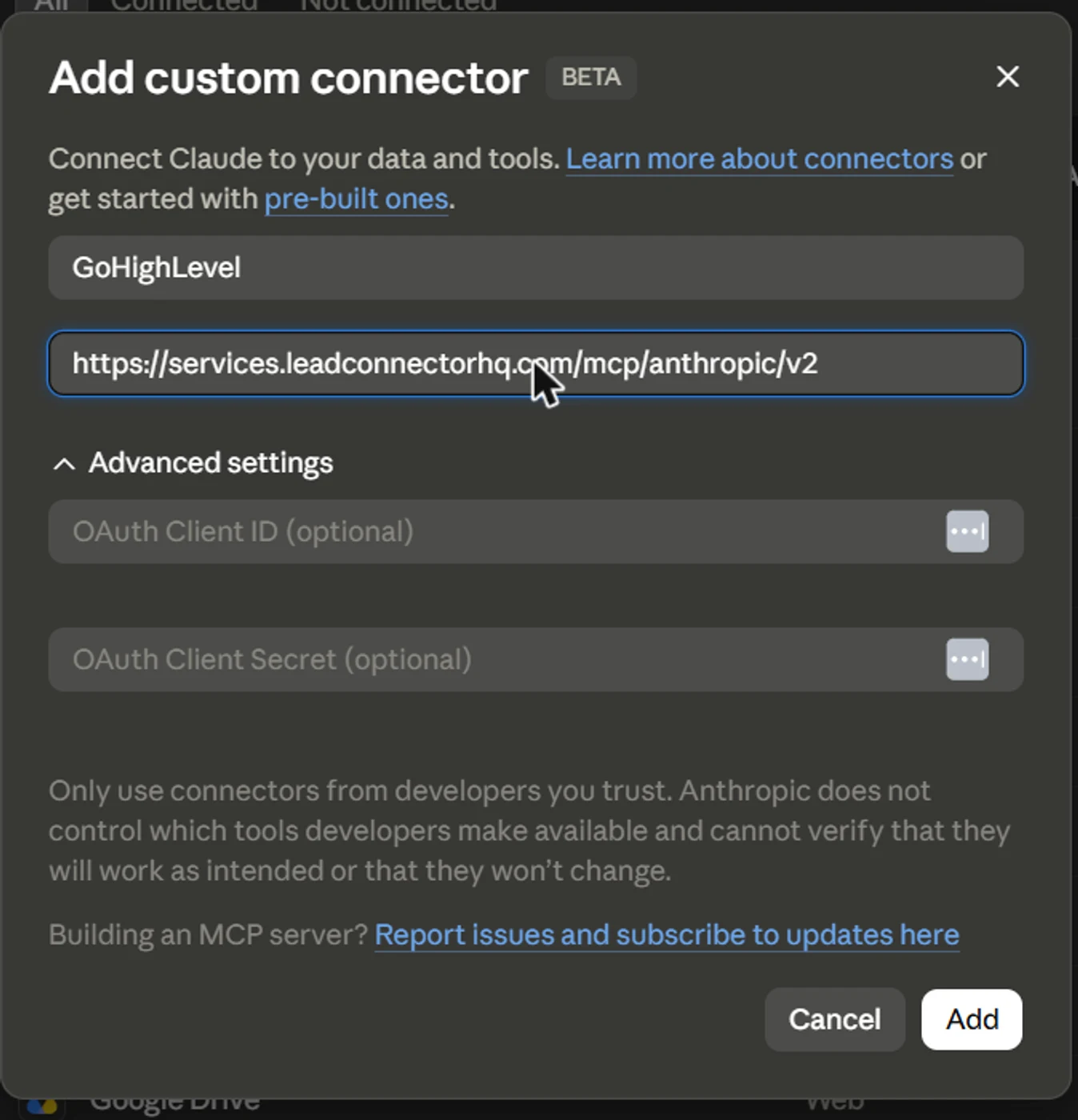
If the tutorial you're reading says the server has '36 tools,' it's describing last year's setup. HighLevel's current docs point Claude users to a newer v2 endpoint: services.leadconnectorhq.com/mcp/anthropic/v2. It works differently. Five tools search, describe, and execute hundreds of operations across roughly 40 areas of your account.
The difference is practical, not academic. On the old endpoint, Claude had a fixed menu. On v2, it looks up the right operation for whatever you asked, then runs it: payments, social posts, blog content, form submissions. More of your account is reachable, and new operations appear without you touching anything.
Sign-in got simpler too. The docs now recommend OAuth: click connect, log into HighLevel in a browser window, approve, done. The older method still works everywhere: pasting a Private Integration Token into a request header. Most guides published this month still only teach the token method.

How do you set up the GoHighLevel MCP server?
You need three things: a GoHighLevel sub-account, either OAuth approval or a Private Integration Token, and Claude on any plan, including Free. Custom connectors are available on every Claude tier, so the connection itself costs nothing.
- In your sub-account, go to Settings → Private Integrations → Create. Select scopes — start with View Contacts, View Conversations, and View Opportunities — then copy the token. It starts with pit-.
- Grab your Location ID from Settings → Business Profile. It's also in your sub-account URL.
- In claude.ai or Claude Desktop, open Settings → Connectors → Add custom connector and paste the v2 endpoint. Choose OAuth if offered, or add the token as an Authorization header plus a locationId header.
- In Claude Code, it's one command: claude mcp add with the endpoint and the same two headers.
- Test it: 'List the contacts created this week.' You should see real names.
Why won't Claude connect? The five errors that break the setup
Nearly every failed setup we've seen traces to one of five causes. Check them in order and you'll fix most problems without opening a support ticket.
- 401: you used a regular API key. Only Private Integration Tokens work — the ones starting with pit-.
- 403: the token is real but missing a scope. Edit the integration, add the scope, save, and retry.
- Data from the wrong client account: your locationId header is missing or wrong. One token, one location.
- 404: usually a bad record ID, sometimes an operation name the server doesn't recognize.
- 'Server not found' on local community servers: almost always a config-file typo or path problem. The official remote endpoint skips that entire class of failure.
Why is speed-to-lead the whole game?
Here's why the speed matters. In May we sat with a dental practice spending about $1,000 a month on ads and generating three or four implant leads a day. Those are $18,000-to-$36,000 cases. Follow-up happened the next business day, and weekend leads waited until Monday. Around 13,000 past patients sat untouched in the database.
That pattern is everywhere. A 2025 study tested how 1,333 law firms handled a web lead. Only 25% responded within five minutes; 26% never responded at all. An assistant that can see the CRM is how that gap starts closing.
What can you actually do with the GoHighLevel MCP server?
The official GoHighLevel MCP server lets Claude read and act on roughly 40 areas of your account in plain English. Those areas include contacts, conversations, opportunities, calendars, payments, invoices, blogs, and social posts. Five tools route every request to the right operation (HighLevel docs, July 2026). You ask. It looks up the operation, runs it, and reports back.
The server has grown up fast. HighLevel launched it — officially the LeadConnector MCP server — on July 28, 2025 with 21 tools. By mid-2026 the help center listed 36. The current docs replace the fixed menu entirely: five tools — search, fetch, and three operation tools — that reach hundreds of operations. Sign-in became one OAuth click, though Private Integration Tokens still work.
This isn't a side experiment, either. In December 2025, Anthropic donated the Model Context Protocol to the Linux Foundation's Agentic AI Foundation. By then the ecosystem had passed 10,000 public servers and 97 million monthly SDK downloads. ChatGPT, Gemini, and Microsoft Copilot all speak it. HighLevel even wired its own in-app Ask AI through the same MCP layer.
Setup takes about ten minutes and costs nothing beyond the plans you already pay for. The full connection guide covers it — and if the account underneath is still half-built, start with the complete GoHighLevel setup guide first. What no doc covers is what to use the connection for. The ten below are the ones that survived on our own client accounts.
Which daily operations does Claude handle best?
Daily operator work is where the connection earns its keep. In HubSpot's AI Trends for Marketers report, updated June 2025, marketers using AI reported saving one to two hours per workday. In the same report, 79% said it cut time spent on manual tasks. The three uses below are that saving, made specific.

1. The morning pipeline brief
Ask: “Summarize what changed in my pipeline since Friday and flag anything stalled.” Claude pulls opportunities, compares stages, and hands you a report before your first call. No dashboard spelunking, no filter-building. The prompt is boring. That's exactly why it gets used every day.
2. The uncontacted-lead sweep
“Find contacts who came in this week with no outbound message yet, then draft a short follow-up text for each.” This is the single highest-value prompt we know. Speed-to-lead decides deals, and the sweep catches every lead your team missed while they were busy doing the actual work.
3. Appointment-day prep
“List today's appointments and flag any that are unconfirmed.” Run it at 8 a.m., send confirmations to the flagged ones, and your no-show rate starts falling the same week. Pair it with notes from each contact's last conversation and you walk into every call already briefed.
Want this running without doing it yourself?
We set up GoHighLevel accounts, wire the AI, and run the follow-up systems for US small businesses — with numbers you can check.
How do agencies use MCP for reporting and audits?
Agencies use the MCP server to compress reporting from hours to minutes. In the same HubSpot survey, 91% of marketing leaders said their teams already use AI to assist their work — and reporting is where most of that assist lands. The pattern: a question you used to assemble across three screens becomes one sentence, answered from live account data.

4. The month-end attribution pull
“Pull closed-won opportunities this month grouped by source.” That one sentence answers the question every client asks: which campaigns actually paid? Send it as-is or drop it into the report deck. When leads arrive from six directions, this is the fastest honest answer we've found.
5. The CRM hygiene audit
“List contacts created this quarter that are missing an email, a phone number, or an owner.” Dirty data quietly breaks automations and skews every report downstream. A monthly hygiene pass through Claude takes minutes, and the fix list arrives pre-sorted instead of buried in a 4,000-row export.
6. Stale-opportunity triage
“List opportunities with no activity in 14 days so we can tag them cold or re-engage.” Deals rarely die loudly. They go quiet. A weekly triage keeps your pipeline number a fact rather than a hope, and gives the team a short, concrete call list every Monday.
One scope note for agencies: the server works one sub-account at a time, so twenty clients means twenty connections, each with its own scoped token or OAuth approval. Name them by client and purpose. If you run a white-label GoHighLevel operation, make connection naming part of client onboarding.
The GoHighLevel MCP use cases most agencies miss
The quiet money is in the database you already own. HighLevel's March 2026 momentum report counts more than a million small businesses on the platform. In our client work, most use a fraction of the contact data they're sitting on. The same report tallies what the platform's AI did in December 2025 alone: 12 million customer messages, a million calls answered, 300,000 review responses. Two uses turn your stored data into booked work.
Ten use cases, one pattern: questions you already ask every week, answered from live CRM data in the time it takes to type them.

7. Database reactivation mining
“Find past customers with no activity in six months who spent over $500, and draft a re-engagement message for each.” Reactivation beats cold acquisition on cost in nearly every account we touch. The list already knows you. Claude just finds it and writes the first draft.
8. Live answers on client calls
“How many leads did the May campaign produce, and how many booked?” Asked mid-call, answered mid-call. Agencies used to say “let me get back to you on that.” With the CRM one question away, account reviews stop being homework and start being conversations.
What does the current endpoint unlock beyond contacts?
More than most operators expect. The current tool surface covers payments, invoices and estimates, products, forms and surveys, the Social Planner, blogs, and emails — alongside the contact and pipeline basics. HighLevel's docs list roughly 40 domains and note more are coming. Two newer uses stand out.

9. Invoice and payment checks
“List unpaid invoices more than 14 days old, with each contact's last conversation.” Awkward-conversation prep, automated. Chasing receivables is the task owners defer longest, and pairing the invoice list with conversation context makes the follow-up message nearly write itself.
10. Content ops through the Social Planner and blogs
“Draft next week's three social posts from this month's five-star reviews.” The newer domains reach HighLevel's Social Planner and blog tools, which turns Claude from a CRM analyst into a content assistant working from real customer language. Review-mining alone justifies the connection. Publishing still deserves a human pass.
| Era | Tools | Auth | What it reached |
|---|---|---|---|
| Launch (Jul 2025) | 21 tools | Private Integration Token | Calendars, contacts, conversations, pipelines, payments |
| Expansion (to mid-2026) | 36 tools | Private Integration Token | Adds blogs, emails, social posting |
| Current unified interface | 5 tools → hundreds of operations | OAuth or token | ~40 domains; new operations appear automatically |
HighLevel MCP docs + help center, retrieved Jul 22, 2026
On cost: no usage pricing is published for the server as of July 2026. Connections and calls run inside the GoHighLevel and Claude plans you already pay for, subject to your account's normal API limits.
What Claude can't do in GoHighLevel yet
Claude can't build workflows in GoHighLevel. It can look them up and enroll or remove contacts, but AI-built workflows are one of the most-upvoted requests on HighLevel's ideas board, at 262 votes and counting. A private integration token covers one sub-account, so 20 clients means 20 tokens. HighLevel's agency install can cover several from one connection, though "every operation executes against one sub-account at a time."
When we needed more than the official server offers, like calendar free-slot lookups and workflow enrollment, we built a small custom integration on GoHighLevel's API. That's the kind of AI-assisted system we build for clients, so take the recommendation with that in mind.

Claude with GoHighLevel or the AI Employee: which do you need?
They're different hires. Claude with MCP is a copilot for you, the operator. It answers, audits, and drafts when you ask. HighLevel's AI Employee is customer-facing automation: Voice AI answers your phone, Conversation AI answers your messages, and it runs whether you're watching or not. We broke down whether the AI Employee is worth the $97 separately. Most businesses that get value from one eventually run both.
The pricing is public. AI Employee Unlimited costs $97 a month per location, with fair-use terms. Pay-per-use is the alternative; voice minutes start around $0.045 plus a text-to-speech rate. That's the cheap way to find out whether your call volume justifies it. HighLevel's Summer of AI trial article no longer resolves, and we can't verify any AI Employee trial as live on 30 September 2026.
Budget tuning time either way. A lawn-care client of ours ran live test calls against their new Voice AI phone agent, and it failed the first round. It collected the caller's number too late and offered a manager too early. The fixes were small and specific: ask for a number up front 'in case we get disconnected,' lower the response randomness, cap calls at six to seven minutes. After that, it booked.
And the July YouTube wave claiming Claude 'killed' GoHighLevel is half true. Claude really can build you a custom CRM in an afternoon. Then you own its hosting, backups, telephony, and carrier compliance forever. For a business with real call volume and client data, that isn't savings. It's a second job.
- Claude + MCP: works for you, the operator. Reads and writes with scopes you choose. Free beyond the plans you already have.
- AI Employee: works for your customers. Answers calls and messages on its own. $97 a month per location, or pay-per-use.
- ChatGPT connector: official but read-only, needs a paid ChatGPT plan with developer mode, and HighLevel notes the data is shared with OpenAI.
Treat the token like a master key
A full-scope Private Integration Token can read and edit everything you granted: contacts, conversations, invoices, payments. Scope it the way you'd scope an employee login. Least privilege, one token per purpose, revoked the day it's not needed.
If you would rather have it set up and scoped properly, that is part of our AI automation work.
- Keep a read-only 'reporting' token for daily questions and audits.
- Create a separate write-enabled token only if you actually want Claude editing records, and only with the scopes that job needs.
- Name tokens by location and purpose so you can revoke one without breaking the rest.
- Rotate on staff changes. It takes a minute in Settings → Private Integrations.
- HighLevel, HighLevel MCP: multi-account support for Claude (6 Aug 2026)
- HighLevel API docs — LeadConnector MCP Server
- HighLevel Support — How to Use the HighLevel MCP Server
- GoHighLevel — Introducing the MCP Server (Jul 2025)
- HighLevel Support — AI Product Pricing (updated Jun 2026)
- HighLevel Support — Summer of AI: agency landing and access control (updated 10 Sep 2026; read 30 Sep 2026). The earlier Summer of AI trial article no longer resolves.
- Anthropic — Introducing the Model Context Protocol (Nov 2024)
- MCP Blog — MCP Joins the Agentic AI Foundation (Dec 2025)
- Claude Help Center — Custom Connectors Using Remote MCP
- Salesforce — SMBs With AI Adoption See Stronger Revenue Growth
- Hennessey Digital — 2025 Lead Form Response Time Study
- HighLevel Ideas Board — Claude → GHL Workflow Automations (Write)
How this was made · Drafted with AI tools from the sources above. Every number was checked against its source by a person. Reviewed and approved by our editorial team. Samar Faizan, editor of record, holds editorial responsibility.